Rytr is a template-driven AI writing assistant that turns short prompts into ad copy, product blurbs, emails, and blog outlines in seconds. For freelancers and small-business owners, the question is whether its low price still makes sense when ChatGPT, Jasper, and SEO platforms are all competing for the same budget.
Rytr is worth paying for if a freelancer, solo marketer, or small business mostly needs short marketing copy and first-draft outlines. Its Unlimited plan costs $7.50 a month on yearly billing. The output is raw material that still needs editing, though. For research-heavy articles, where facts and depth carry the piece, Rytr is a poor fit.
This Rytr review weighs editing time against price to help readers choose a plan, or confidently pick a different tool.
Is Rytr Worth Using in 2026?
Rytr earns its place with quick, repeatable copy jobs. The pattern is pretty consistent: short formats need light edits, while long drafts call for heavy rewriting and fact-checking.
Where Does Rytr Perform Best?
Rytr is strongest at short-form content with a clear structure:
- Product descriptions built from a product name and a few features
- Social media posts and ad captions for Facebook, LinkedIn, and X
- Marketing copy such as email subject lines, calls to action, and landing page blurbs
- Blog post outlines that give a writer a starting skeleton
These jobs suit a template tool because the format is fixed and there’s not much input to provide. Pick a use case, set a tone, add a short brief, and Rytr gives you several versions to choose from.
Input quality shapes the result. Rytr’s help center sets an input range of 25 to 500 characters depending on the use case and warns against fragments like “email marketing for.” A specific brief with the audience, offer, and one selling point will usually produce much cleaner copy than a vague phrase.
Can Rytr Handle Long-Form Articles?
Rytr can build long-form content, but it has to be done section by section. Its documentation describes a workflow where users generate an outline, write each heading with the Paragraph command, then extend text by selecting 100 to 1,000 characters and clicking Continue Ryting.
That process works for a rough draft. But the writer still has to manage flow, transitions, and accuracy across every section. Rytr doesn’t pull live research into its drafts, so statistics, dates, and product details need checking by hand. For a 2,000-word article, Rytr saves time on structure, but leaves the substance to the writer.
What Are Rytr’s Biggest Pros and Cons?
The Rytr pros and cons come down to cost versus cleanup time.
Pros
- Low entry price and a free plan with 10,000 characters a month
- More than 40 use cases covering common business writing
- Editing tools that shorten, expand, rephrase, and improve text
- A Chrome extension that works inside other web apps
- Tone matching on paid plans
Cons
- AI-generated content needs editing before publishing, especially past a few paragraphs
- No built-in fact-checking or live web research
- Light SEO support compared with dedicated optimization tools
- Multiple languages and multi-brand tones sit on the higher tier
What Are Rytr’s Main Features?
Rytr’s features center on templates, tone controls, inline editing, and a plagiarism check, with lighter help for SEO tasks. Each one is most useful for a specific job, like rewriting a clunky paragraph or drafting ten ad variations.
How Do Templates, Tone Selection, and Editing Work?
The AI writer runs on use cases. The homepage lists 40+ use cases for creating, editing, and improving content, from product descriptions to blog section writing.
Tone selection sits beside each template. Rytr offers over 20 preset tones or a custom option, so a user can switch a caption from “convincing” to “casual” without rewriting the brief.
Editing commands handle cleanup inside the editor:
- Highlight a sentence or paragraph.
- Choose an action such as Rephrase, Shorten, Expand, or Improve.
- Accept, regenerate, or edit the result by hand.
This is where Rytr saves the most real time. Fixing a wordy intro or tightening a product bullet takes seconds, and the writer stays in control of the final wording.
What Can the Plagiarism Checker Tell You?
The plagiarism checker flags text that matches existing web content, which can help catch accidental copying. It doesn’t guarantee originality or prove a piece is safe to publish.
Rytr admits its model sometimes repeats phrases from its training data, especially in short-form output. Duplicate wording shows up most in copy like slogans and taglines, so those pieces deserve a check. Paid plans include a monthly allowance of checks; free users get none.
How Useful Is Rytr for SEO Content?
Rytr helps with SEO-adjacent writing, mostly by speeding up small pieces. Users can draft blog post outlines from a few keywords, write meta descriptions, and generate keyword ideas to work into headings.
That makes it handy for:
- Turning a target keyword into a first outline
- Writing several meta descriptions to test
- Drafting section text that includes a chosen keyword
Rytr doesn’t show how top-ranking pages are built or score a draft against them. Serious keyword research and SERP analysis belong to dedicated tools, covered in the pricing comparison below.
What Else Does Rytr Offer Writers?
A few extras make Rytr more practical day to day:
- My Voice tone matching. Rytr analyzes a writing sample and mirrors that tone, and users can create separate tones for different clients.
- Chrome extension. Users select between 30 and 300 characters of text on any site to rewrite or expand it in place.
- Writing profile. Freelancers can set up a public writing profile to show their work.
- Languages. The product description generator, for example, can write in over 30 languages, though full language access depends on the plan.
The extension is especially handy for email and social work, where switching tabs to an AI tool can slow things down.
How Much Does Rytr Cost, and How Does It Compare?
Rytr is one of the cheapest AI writing tools with unlimited generation. Rivals cost more because they do more research, collaboration, or SEO work.
Which Rytr Pricing Plan Makes Sense?
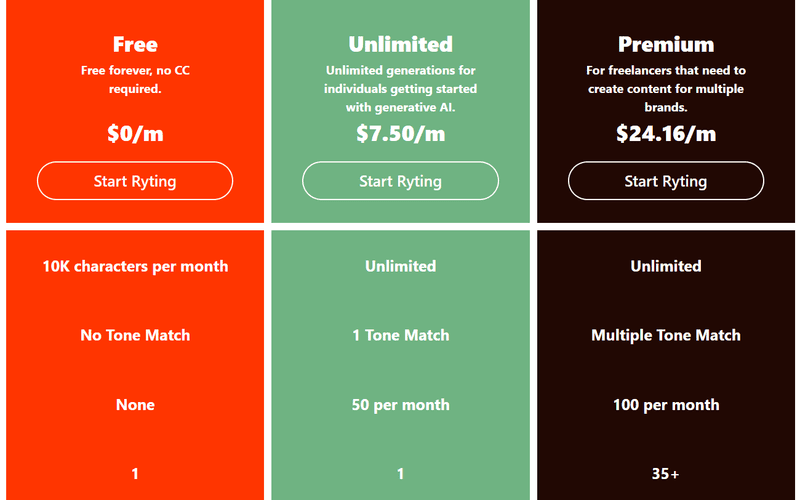
Rytr pricing has three tiers. On yearly billing, Rytr lists Unlimited at $7.50 a month and Premium at $24.16 a month, with yearly plans giving two months free. Monthly billing runs about $9 and $29.
- Free ($0): 10,000 characters a month, no tone match, no plagiarism checks, one language
- Unlimited: unlimited generation, one tone match, 50 plagiarism checks a month, one language, doubled input limit
- Premium: unlimited generation, multiple tone matches, 100 plagiarism checks a month, 35+ languages, tripled input limit
Most solo users should start on Free, then move to Unlimited once they hit the cap. Premium makes sense for freelancers juggling several brand voices or writing in more than one language. Rytr also states that users own the content they create, subject to its terms.
Rytr vs. ChatGPT: Templates or Flexible Prompting?
The Rytr vs ChatGPT choice comes down to structure versus range. Rytr guides users through fixed templates, which helps if you don’t want to write prompts.
ChatGPT handles open-ended work. It can draft, rewrite, summarize, and translate, and it can search the web for recent information. Its deep research mode produces structured reports with citations that users can verify.
That’s useful for research-heavy drafts, where Rytr has no live sources. ChatGPT’s top tiers are costly, with Pro plans at $100, $200, and $500 a month, but lower plans cover most writing needs. If you’re comfortable prompting, you’ll get more from ChatGPT; template fans will move faster in Rytr.
Rytr vs. Jasper and Writesonic: Which Workflow Fits?
Rytr vs Jasper is a solo tool versus a marketing team platform. Jasper Pro costs $59 a month billed yearly or $69 monthly, and its brand features flag off-brand tone and suggest fixes. Teams running campaigns across channels and approvals can get value from those features that Rytr doesn’t target.
Rytr vs Writesonic is a bigger gap. Writesonic now focuses on AI search visibility, with its Starter plan at $79 a month billed annually covering 15 AI articles and site audits. That suits brands tracking how ChatGPT and Google AI Overviews mention them.
A freelancer writing captions and product copy probably doesn’t need either platform. A marketing team with brand rules or search visibility goals likely does.
Which Rytr Alternatives Offer Stronger SEO Tools?
For SEO, the strongest Rytr alternatives look at search results before they write:
- Frase: researches ranking pages, builds a brief, and scores drafts as you write. Plans start at $39 a month billed yearly.
- Surfer SEO: its Content Editor accepts up to 20 keywords per editor and provides real-time optimization scores. The Discovery plan starts at 49 EUR a month billed yearly.
- NeuronWriter: analyzes competing pages to find terms and content gaps. Its Bronze plan costs $23 a month, or $19 a month with yearly billing.
- Copy.ai: a better fit for sales and marketing teams, with a Chat plan at $29 a month billed monthly.
Choose Rytr for Quick Copy, Not Research-Heavy Drafts
Rytr works well for people who write lots of short, structured copy and want to keep costs down. Product descriptions, social posts, ad variants, and outlines are usually usable after a quick edit. Long articles, factual reports, and SEO pages call for more than Rytr offers.
A sensible way to start is with the free plan. Run a week of real client or store tasks through it, then track the editing time for each piece. If edits take only a few minutes, Unlimited at $7.50 a month with yearly billing is a fair buy.